Upgrade, cancel and refunds
How to upgrade to Pro, pay monthly or yearly, cancel at any time, and get a refund within 14 days of your first payment.
Upgrade to Pro
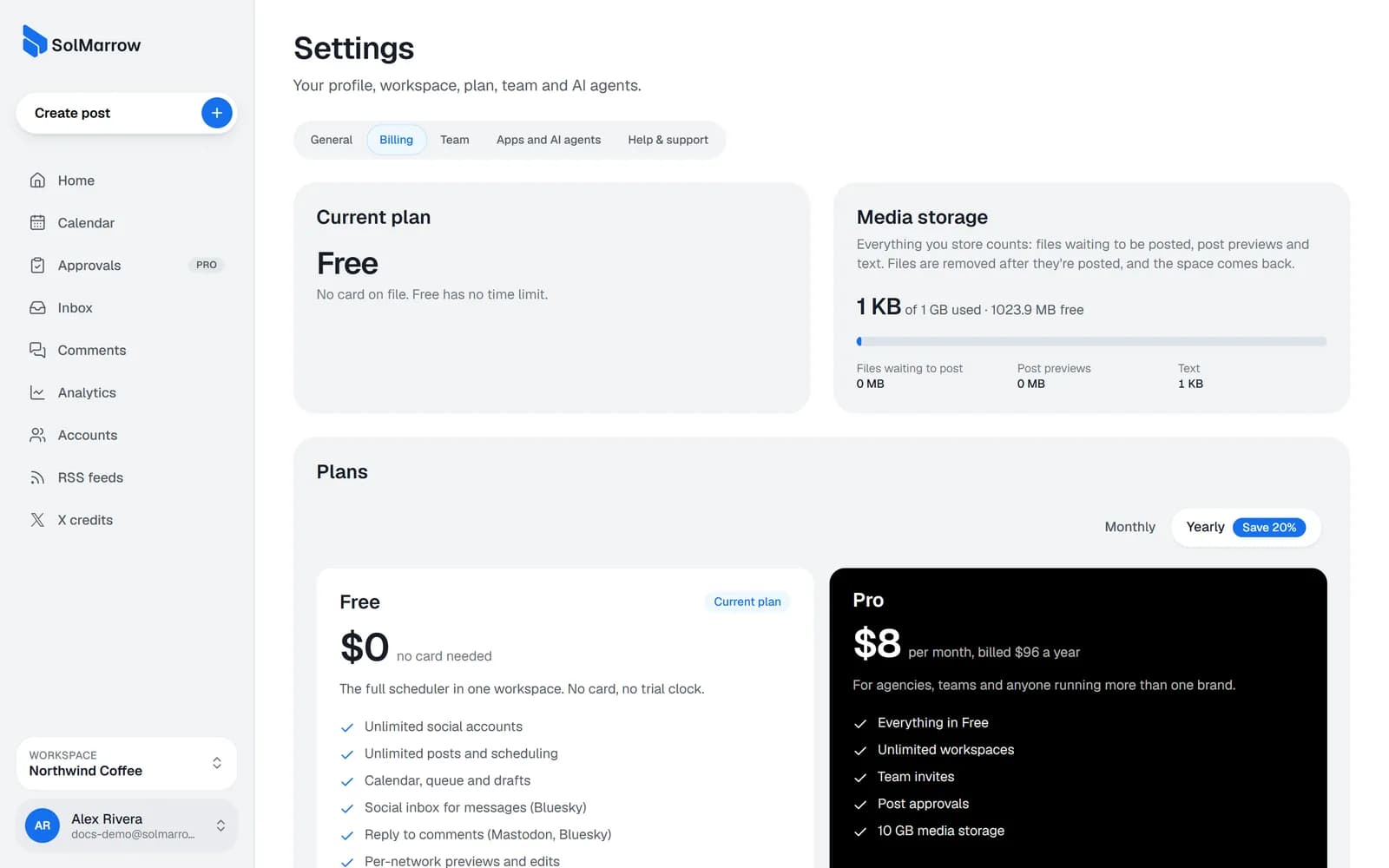
- Open Settings → Billing.
- Choose monthly ($10) or yearly ($96, save 20%).
- Click Upgrade to Pro and pay in the secure checkout.
Pro turns on within a few seconds. Payments are handled by Creem, our merchant of record; taxes are added at checkout where they apply, and Creem emails your receipt.
Cancel
- Open Settings → Billing and click Manage billing.
- Cancel your subscription.
Pro stays active until the end of the period you paid for, then your account moves to Free.
What changes when you move to Free
- Extra workspaces become view-only (nothing is deleted).
- Team members lose access to workspaces that need Pro.
- Storage goes back to 1 GB. New uploads stop if you are over the limit, until files are posted or removed.
Refunds
- First Pro payment: full refund within 14 days, monthly or yearly.
- Renewals aren't refunded, except where the law requires it.
- Unused X credits: refundable within 14 days of purchase.
Email support@solmarrow.com from your account's address, or reply to your Creem receipt. See the full Refund policy.
Still need help? Email support@solmarrow.com. A person reads every message and answers within 1 business day.