Best Free Social Media Scheduling Tools in 2026
Compare free social media schedulers in 2026. See account caps, monthly versus queued post limits, supported channels, and the catches before you sign up.
Top lists12 min read
Free scheduling tools can be genuinely useful, especially if you're running just a few accounts. The catch is that each provider defines its free limits differently. Before you move your content calendar to a new tool, make sure you know what those limits actually mean.
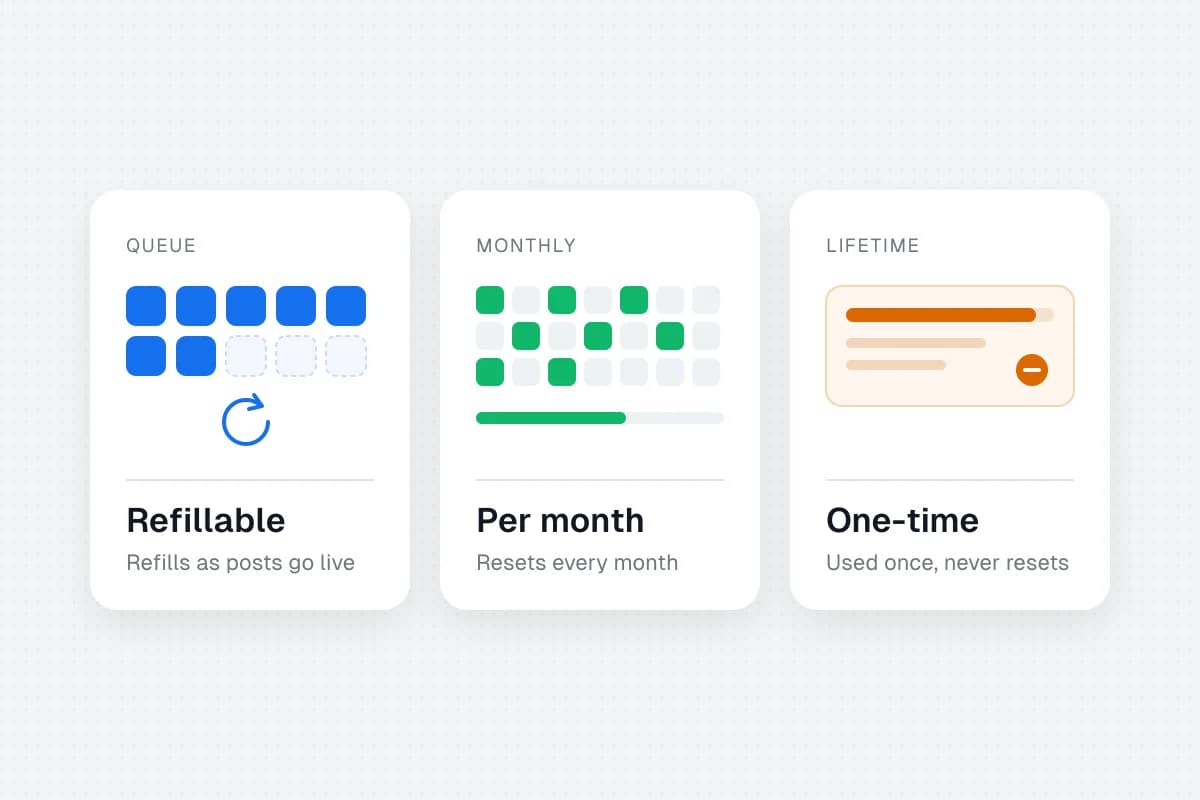
One tool lets you queue ten posts per account and refill the queue as posts go live. Another allows twenty posts per month, no matter how you spread them across your channels. A third gives you fifty posts in total and never resets the allowance.
Those are very different deals.
If you're looking for the best free social media scheduling tools, start with the limits that affect your actual workload: connected social accounts, posts, supported networks, and the ability to keep scheduling after a trial ends.
Which free social media scheduler should you choose?
A few options make sense depending on what you need:
- Buffer or Publer if you want a simple queue for up to three channels. Publer's free plan excludes X.
- Metricool if basic analytics matter and twenty scheduled posts a month are enough.
- Pallyy if your work is mostly visual content and you publish occasionally.
- Typefully if you mainly write posts for text-led networks.
SolMarrow takes a different approach. Its free plan has no cap on posts and lets you connect one account on each network it supports, in one workspace, under a fair use policy. Posting to X needs X credits or your own X developer key, and a few networks open only after that platform approves SolMarrow. Check that the networks you need are open before you move a calendar.
If you only publish to Facebook and Instagram, Meta Business Suite may be enough without introducing another service.
Here's how the free plans compare at a glance.
| Tool | Type of free access | Main free allowance | Main catch | Best fit |
|---|---|---|---|---|
| SolMarrow | Ongoing free plan | Unlimited posts; one account per network in one workspace, under fair use | X needs credits or your own key; some networks wait on platform approval | One brand on many networks |
| Buffer | Ongoing free plan | 3 channels; 10 queued posts per channel | One-user free plan; short queues | Solo creators |
| Publer | Ongoing free plan | 3 accounts; 10 queued posts per account | X excluded on Free | Small cross-platform teams of one |
| Metricool | Ongoing free plan | 1 brand; 20 posts per month | X and LinkedIn excluded | Creators who want basic analytics |
| Pallyy | Ongoing free plan | 1 social set; 15 image posts per month | Video and carousel publishing require paid plans | Image-led accounts |
| Typefully | Ongoing free plan | 1 social set; 10 posts per month | Primarily designed for text-led networks | Writers and founders |
| Planable | One-time free allowance | First 50 created posts, no expiry date | Allowance never resets | Testing approval workflows |
| Meta Business Suite | Free native platform tool | Scheduling for connected Facebook/Instagram properties | Not a multi-network scheduler | Meta-only businesses |
First, understand the three kinds of "free"
The fastest way to choose the wrong scheduler is to compare numbers that mean different things.
1. Refillable queue limits
A queue limit measures how many posts can be waiting to publish at one time. Buffer and Publer both offer ten pending scheduled posts per connected account on their free plans. When a scheduled post publishes, a slot becomes available.
Imagine that you schedule one post every weekday. A ten-post queue lets you plan roughly two workweeks ahead on that channel, then keep adding new posts as earlier ones publish.
2. Monthly posting limits
A monthly limit counts how many posts you can schedule or publish in the billing/calendar period. Metricool's free plan allows up to twenty posts per month; Pallyy allows fifteen.
If you run three networks and plan five posts per week for each, your plan may need roughly sixty-five publishing actions per month. A twenty-post monthly allowance will not cover that workflow even if the account connection limit looks generous.
3. Lifetime or trial allowances
Planable's free offer is particularly easy to misunderstand. You can create fifty posts at no charge without a deadline, but each created post counts toward a lifetime total. Deleting a post does not restore that slot, and the allowance does not refresh next month.
This makes it useful for evaluating planning and approvals, not a permanently refilling publication budget.
SolMarrow for one brand on many networks
SolMarrow is built for people who want a central calendar, multi-network publishing, and options for connecting AI agents or developer tools.
The free plan includes one workspace, one connected account on each supported network, and unlimited scheduled posts under the fair use policy. It also includes a REST API and an MCP server for agent-driven workflows. A second account on the same network, such as a second Instagram profile, needs another workspace, and extra workspaces are part of Pro.
The most important qualification is network availability. Some networks open only after that platform reviews and approves SolMarrow, so check the network list in the app before you plan around one. Posting to X uses X credits or your own X developer key, because X charges for each post made through its API.
Where it fits: One business or creator who wants to post to many networks without a per-post or per-channel cap.
Where to be careful: Two accounts on the same network, the content formats you rely on, and any X costs. Check those before moving your whole workflow.
See SolMarrow's plans to check the current details.
Buffer for keeping three channels organized
Buffer's free plan allows three connected channels and ten scheduled posts per channel waiting in the queue. The limit is not ten posts for the entire month. Once a post publishes, you can add another.
That makes Buffer a sensible choice if you manage, for example, one Instagram account, one LinkedIn profile, and one Facebook Page.
The free plan also includes a single user, an ideas area, and access to some basic insights and AI-assisted features. Advanced analytics, team approvals, and some publishing enhancements belong to paid tiers.
Best for: A solo creator or small business with up to three channels.
Watch out for: If you need five connected profiles or want to schedule a month's worth of daily posts on each one at once, the free queue may feel tight.
Buffer pricing · How its queue limit works · SolMarrow vs Buffer
Publer for scheduling across three free accounts
Publer's free tier supports three social accounts and ten pending scheduled posts per account. Like Buffer, those slots become available again as scheduled content is published.
The main differences are worth noticing. Publer excludes X from its free plan and limits stored published-post history to twenty-four hours. It also lists one workspace and one user for Free.
For simple social posting, this can be enough. For teams that need an extensive archive of past posts or X publishing, the free limitations matter much more.
Best for: A creator with three non-X accounts who wants a basic publishing queue.
Watch out for: X exclusion, short post-history retention, and platform-specific eligibility rules.
Publer plans · Publer free-plan details · SolMarrow vs Publer
Metricool for basic scheduling and analytics
Metricool's free tier supports one brand and up to twenty scheduled posts per month. It also includes access to thirty days of analytics and the ability to analyze a limited number of competitor profiles.
There is a trade-off: the free tier excludes LinkedIn and X connections. For a business whose primary channel is LinkedIn, that restriction makes Metricool a poor match, even though its reporting tools may look attractive.
For an Instagram-, TikTok-, Pinterest-, or Facebook-focused business, it deserves a closer look.
Best for: An individual brand that wants a publishing calendar and accessible analytics in one place.
Watch out for: Twenty scheduled posts a month is a monthly allowance, not a continuously refilling queue. LinkedIn and X are excluded on Free.
Metricool pricing · SolMarrow vs Metricool
Pallyy for a visual-first content calendar
Pallyy offers one free social set, one user, and fifteen scheduled posts per month. A social set groups one brand's platform accounts together, rather than necessarily representing just one connected account.
The free product is a reasonable way to test Pallyy's planning approach when most of your content is image-led. But if your calendar depends on videos, carousels, Reels, or collaboration features, read the detailed limitations before making the switch.
Best for: A visual-focused creator posting relatively infrequently.
Watch out for: Media-format restrictions and a small monthly scheduling allowance.
Pallyy free plan · Pricing and feature limits · SolMarrow vs Pallyy
Typefully for writers and founders
Typefully is particularly relevant to founders, consultants, and writers who treat social media as an extension of their writing practice.
Its free plan includes one social set, one user, and ten posts per month. Its pricing page also lists agent, API, and MCP capabilities among the free features, subject to product limits.
It is not an all-purpose replacement for a visual content calendar spanning every network. But for drafting, scheduling, and distributing text-heavy updates, its focused workflow may be more comfortable than a general-purpose dashboard.
Best for: Writers, founders, and text-led social publishing.
Watch out for: Ten posts monthly and the network mix.
Planable for trying out content approvals
Planable is best understood as a way to try collaborative content planning without paying upfront. Its first fifty created posts are free, with no expiration date.
The unusual part is that the fifty-post allowance is lifetime-based. The limit does not reset each month. A post created and then deleted still counts, and duplicating content across networks can use multiple slots.
That makes Planable appealing when you need to examine a client review process or stakeholder approvals before choosing software.
Best for: Agencies and teams evaluating a structured approval workflow.
Watch out for: This isn't an indefinitely renewable free publishing allowance, and X publishing is unavailable during the free trial.
Planable pricing · How the 50-post limit works · SolMarrow vs Planable
Meta Business Suite for Facebook and Instagram
Not every business needs a third-party social scheduler.
If your content is limited to Facebook and Instagram business properties, Meta Business Suite can help you prepare and schedule posts through its own publishing tools. There is no need to pay for another service simply to keep a small Meta-only content calendar.
The limitation is scope. This does not give you the same shared calendar across LinkedIn, TikTok, Bluesky, Pinterest, or other unrelated social networks.
Best for: A business managing only its Facebook and Instagram presence.
Watch out for: This is a platform-specific workflow, not a single dashboard for every network.
Which free tool makes the most sense for you?
Rather than pick a winner based on the longest feature list, match the free plan to the work you'll actually do.
You manage two or three profiles and publish a few times a week. Buffer or Publer is likely enough. Their refillable queues can support regular posting without requiring a monthly paid plan.
You want lightweight analytics next to your posts. Metricool is worth considering, provided LinkedIn and X are not essential and twenty scheduled posts per month is sufficient.
You post one brand to many networks. Look at SolMarrow's free plan: no post cap and one account on each supported network. Check that your networks are open and factor in any X costs. Several brands, or two accounts on the same network, need Pro.
You write most of your social content yourself. Typefully may suit you better than a larger dashboard, especially if your channels are built around concise text and longer written updates.
You need to practice client approvals. Planable's fifty-post allowance can help you test the workflow before committing to a paid plan.
You only use Facebook and Instagram. Start with Meta Business Suite. Paying for an extra scheduling layer is unnecessary if the native tools meet your needs.
How to choose a free scheduler in eight steps
Open each tool's pricing and help pages and answer these questions.
- How many individual profiles can I connect? A brand, workspace, social set, and connected account may mean different things.
- Is the post limit monthly, queued, or lifetime-based? This is usually the biggest practical difference.
- Can the free plan publish to my actual network? Check account type, such as a personal profile versus a company Page, and don't confuse a listed integration with live posting access.
- Does it support the content I publish? Photos, carousels, vertical videos, stories, and long-form text can have different rules.
- Does a scheduled post publish automatically? Some networks or formats may need a reminder or a manual final step.
- What happens to historical posts and analytics? Short retention windows matter when you create monthly reports.
- Do I need another person to approve posts? Workflow and team permissions are often paid extras.
- Will I need to pay for X or another platform separately? Network-level API costs and eligibility may differ from the scheduler's headline price.
Try one real post on each required network before migrating dozens of scheduled posts.
Frequently asked questions
Is there a completely free social media scheduler?
Yes. Buffer, Publer, Metricool, Pallyy, and Typefully list ongoing free plans, although each has limits. Meta Business Suite provides free native scheduling for qualifying Facebook and Instagram accounts. SolMarrow also has an ongoing free plan with no post cap, under a fair use policy.
What is the difference between a queue limit and a monthly limit?
A queue limit controls how many future posts can wait at once. Once a post publishes, the slot may reopen. A monthly limit controls how many posts can be scheduled during a particular month. Planable's one-time fifty-post allowance works differently again because its total does not reset.
Can I schedule posts to unlimited social media accounts for free?
Not on any plan compared here. SolMarrow comes closest for a single brand: unlimited posts and one account on each supported network, in one workspace. A second account on the same network needs another workspace, which is part of Pro. Most other free plans stop at three accounts or one brand.
Is Hootsuite free?
Hootsuite advertises a trial rather than a permanent general-purpose free publishing plan. If you need a no-cost tool without an expiration date, compare ongoing free tiers instead of counting temporary trials.
Can I schedule posts for free on YouTube?
Yes. YouTube Studio supports choosing a future date and time for an uploaded video to become public. That does not provide a cross-platform content calendar. See YouTube's official instructions.
Which free scheduler is best for a small business?
If a business has no more than three connected channels, Buffer or Publer is a solid starting point. If reporting is the priority and the business doesn't need X or LinkedIn, try Metricool. If it posts one brand to many networks, look at SolMarrow's free plan with the X and network caveats above.
Final thoughts
A free scheduling tool is only useful if it remains free for the workload you actually have.
Count profiles first, then work out how many posts you create each month. Check the content formats and networks you depend on. A plan that looks generous in a comparison table might still require an upgrade the moment you need one more connected account or a longer queue.
If you want one brand on many networks without a post cap, take a look at SolMarrow. Check the specific networks you need, start with a small schedule, and keep the tool that makes your work easier without hidden surprises.