How to Automate Social Media Scheduling with n8n
Build an n8n social media scheduling workflow with triggers, approvals, OAuth-connected publishing and failed-post checks.
Guides7 min read
n8n can connect the steps around social media publishing: collecting an idea, preparing a caption, requesting approval, scheduling the post and checking whether it went live. The important part is not making every step automatic. It is making the workflow predictable enough that one failed API call does not publish the wrong message or create duplicates.
This tutorial uses n8n as the workflow orchestrator and SolMarrow as an example of a social scheduler with an MCP integration. It describes a design you can adapt, not a claim that the example has been executed in your account.
Sketch the workflow before opening n8n
Write down the trigger, the input, the approval rule, and the output. For a small team, a weekly schedule is often a better starting point than posting whenever a new row appears in a spreadsheet.
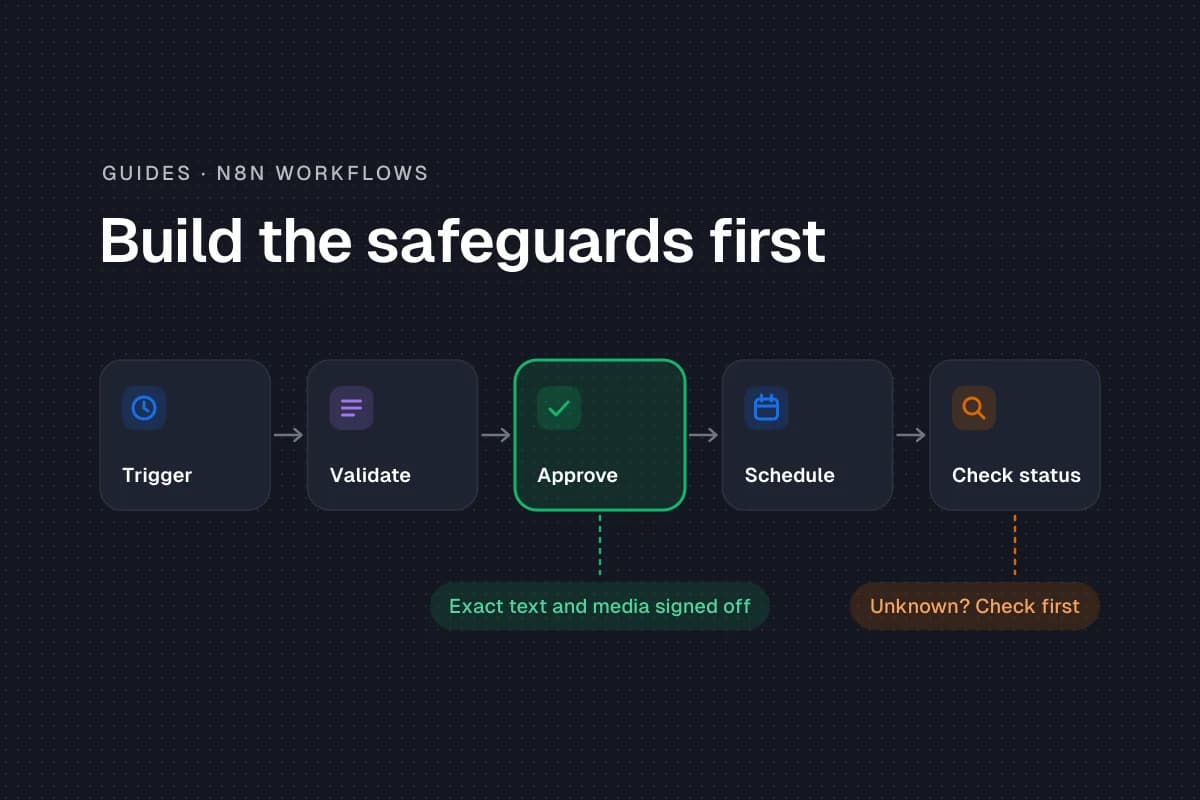
A simple design looks like this:
- A scheduled trigger starts the workflow.
- A data source provides approved content ideas.
- A validation step checks required fields.
- An optional AI step proposes a caption.
- A human approves the exact final text and media.
- The publishing integration creates a scheduled post.
- The workflow stores the post ID and checks the result later.
Keep approval outside the generative step. A model can suggest copy, but it cannot establish that a product claim or promotional offer is true.
Choose the right trigger
n8n offers different ways to begin a workflow. A scheduled trigger suits recurring batches. A webhook suits events sent from another system. A manual trigger is useful while testing.
| Trigger | Good use | Main risk |
|---|---|---|
| Scheduled run | Prepare a weekly batch | Wrong timezone or repeated run |
| Webhook | React to an approved item | Duplicate incoming events |
| Manual | Test with one account | Forgetting to switch to a production trigger |
| App event | Respond to a new source record | Unreviewed changes becoming publishable |
Check the official n8n documentation for current trigger configuration and deployment requirements. A trigger firing successfully only proves the workflow started, not that a social post was published.
Define the content record
Keep the data structure small and explicit. The workflow should know what to publish and how to identify it later.
| Field | Example | Why it matters |
|---|---|---|
| Content ID | launch-update-042 | Prevent duplicate processing |
| Workspace | Authorized brand workspace | Keep clients separate |
| Network | LinkedIn profile | Match account type |
| Caption | Approved final text | Avoid changing approved wording |
| Media URL | Authorized image location | Verify file availability |
| Local schedule | 2026-12-03 09:00 America/New_York | Avoid timezone ambiguity |
| Approval | Approved by content owner | Enforce review |
| Result ID | Filled after scheduling | Track downstream status |
These are illustrative fields, not an n8n import schema or a live SolMarrow API payload. Do not copy them into an HTTP request without checking the integration's parameters.
Connect n8n to a publishing tool
SolMarrow's official n8n integration guide describes connecting its remote MCP server using n8n's MCP Client Tool node with OAuth2 credentials. The documented server endpoint is https://mcp.solmarrow.com/mcp.
The official SolMarrow n8n integration guide lists tools to find workspaces and accounts, create posts, inspect posts and retrieve analytics. Confirm current tool descriptions and permission scopes inside your n8n environment before making a publishing request.
A cautious setup sequence is:
- Create a test workflow in n8n.
- Add an AI Agent and the MCP Client Tool following the official guide.
- Set up the MCP OAuth2 credential and authorize your SolMarrow account.
- Ask the connected tool to list the workspaces or accounts available to you.
- Restrict the workflow to a test account and a draft action first.
- Review the saved draft in the scheduler before attempting a timed post.
The SolMarrow n8n documentation states that the integration works with n8n Cloud and self-hosted n8n. Hosting n8n yourself may still require infrastructure and maintenance; self-hosted does not mean every deployment is cost-free.
On the SolMarrow side, MCP access is part of the free plan, and the MCP OAuth2 credential registers itself with SolMarrow, so there is no client ID or API key to copy. To remove access later, use Settings, AI agent (MCP) in SolMarrow or delete the credential in n8n. If you would rather work from a chat assistant than a workflow, see how to use ChatGPT to plan and schedule social media posts.
Add a validation gate
Before publishing, reject records missing a required field. Also check whether the item has already been scheduled.
Useful checks include:
- Content ID has not been processed successfully.
- Destination account belongs to the expected workspace.
- Caption and media match the approved version.
- Any offer, price or deadline has a verified source.
- Scheduled time is in the future and includes a named timezone.
- The target network supports the chosen media format.
Do not rely on an AI model to enforce all these rules. Use deterministic checks where possible, and route uncertain records to a review queue.
Handle approval without accidental publishing
One approach is to let n8n create a draft and notify the reviewer. The workflow resumes only after the content owner records an explicit approval. If text or image changes, reset approval for that item.
Store the approval alongside the content version. Otherwise, a reviewer may approve one caption while a later run schedules another.
For urgent announcements, consider a manual hold switch. A scheduled automation should be easy to stop when a product release is delayed or an event changes.
Make retries safe
External systems can time out even after accepting a request. If the workflow automatically retries without checking, it may create the same social post twice.
Use a unique content ID, store the returned scheduling ID, and check the remote system before retrying. Treat a missing response as an unknown state, not proof of failure.
A sensible error path captures the error, marks the record as needing attention, and notifies the responsible editor. Avoid printing OAuth tokens or sensitive customer data into logs.
Check publishing results
After the scheduled time, retrieve post status from the connected tool when available. If the scheduler reports success, verify the destination URL on the social platform.
| Result | Workflow action |
|---|---|
| Draft created | Wait for approval |
| Scheduled | Save post ID and planned time |
| Published | Save verified public URL |
| Failed | Record error and request correction |
| Unknown | Check remote status before any retry |
This second check matters because a scheduling request can succeed while later network publication fails.
Measure outcomes without inventing ROI
n8n can collect data from connected systems, but a number is useful only if you know its source. Track published versus failed posts, approval time and metrics the social network actually returns.
The SolMarrow n8n integration page lists a get_analytics tool. That does not guarantee identical analytics fields for every social network. Use platform documentation to interpret reach, impressions, engagement and clicks, and avoid claiming revenue attribution without supporting records.
Common questions
Do I need to write JavaScript to automate social posts in n8n?
Not necessarily. Many workflows use visual nodes and supported credentials. Complex validation or custom APIs may still require technical configuration.
Can n8n publish to every social network?
No integration should be assumed to support every network, account type or media format. Check the current destination list and exact capabilities. SolMarrow lists its networks on its social media page; TikTok and LinkedIn Pages open as each platform approves SolMarrow, and posting to X needs X credits or your own X key.
Should I remove human approval once the workflow works?
Not automatically. Approval is especially useful for client accounts, promotional claims and sensitive announcements. You can automate repetitive checks while keeping the final decision with a person.
What is the best first workflow?
Start with one manually triggered draft, one account, one approval and one status check. Expand only after you understand the error path.
Sources
- SolMarrow n8n MCP integration, official integration and tool description, consulted November 23, 2026.
- n8n documentation, official workflow and node reference.
- SolMarrow pricing, official plan descriptions.
The most useful automation is the one your team can inspect, pause and recover. Build safeguards first, then increase the number of accounts and scheduled posts.